

Wondering how tourists pay in China? For most international visitors, the easiest option is to use Alipay, with WeChat Pay as a useful backup. You can generally link an eligible international visa, Mastercard, or other supported card without opening a Chinese bank account.
For families, the good news is that you usually do not need a separate Alipay account for every child. One parent can handle most everyday payments, including restaurants, taxis, transport, attractions, and shopping.
Cash is still useful as an emergency backup, but QR-code payments are now a much more practical way to pay for everyday travel.
Yes, tourists can use Alipay and WeChat Pay in China with a foreign passport and an international Visa, Mastercard, or other supported credit/debit card. You do not need a Chinese bank account.
For most first-time visitors from the West, this is often the biggest surprise about traveling in China. While Apple Pay, Google Pay, and physical bank cards are common at home, most businesses in China rely on QR-code payments through Alipay and WeChat Pay.
⚡ 2026 Quick Summary for Families:
- ✅ Best payment app for tourists: Alipay
- ✅ Backup app: WeChat Pay
- ✅ Chinese bank account needed? No
- ✅ Do kids need their own Alipay account? Usually, one parent can handle most family payments.
- ✅ Is cash still useful? Yes, but only as an emergency backup
- ✅ Fees: 0% on most transactions under 200 RMB; a 3% fee may apply above that amount
Why this matters:
We’ve traveled across Beijing, Chongqing, Chengdu, Shanghai, and Zhangjiajie with two young kids and quickly learned that paying in China works very differently.
We landed in Beijing with a wallet full of cash, assuming we were prepared. Then a street-food vendor pointed to a QR code and shook his head at our banknotes.
That was our first lesson: China with kids isn’t difficult because of the language or culture—it’s difficult because the everyday systems are different.
| Payment Method | Recommended for Tourists? |
|---|---|
| Alipay | ✅ Yes |
| WeChat Pay | ✅ Yes |
| Cash | ⚠️ Backup only |
| Visa/Mastercard Directly | ❌ Limited |
| Apple Pay | ❌ Not widely accepted |
This practical guide explains exactly how tourists can use Alipay and WeChat Pay in China, avoid common payment mistakes, and travel confidently with kids in 2026.
Still working out your China trip? Our China With Kids guide breaks down the basics of planning a family trip, including where to go, how to get around, and what to expect with children.
Is China Really Cashless?

If this is your first trip to China, the answer may surprise you.
Technically, China is not completely cashless. Cash is still legal tender, and by law, businesses are supposed to accept it.
But in day-to-day travel, China feels almost entirely cashless.
From metro stations and convenience stores to local restaurants and street-food stalls, most people simply pull out their phones and scan a QR code. During our travels through China, it was far more common to see people paying with Alipay or WeChat Pay than with physical cash or bank cards.
For tourists, this means one thing:
You can still carry cash, but you shouldn’t rely on it.
Can You Still Use Cash in China in 2026?
Yes, but think of cash as your emergency backup rather than your primary payment method.
The biggest challenge isn’t that businesses refuse cash. It’s that many small vendors no longer keep enough change on hand because almost everyone pays digitally.
We encountered this at snack stalls, local markets, and small takeaway shops where vendors happily accepted cash but struggled to break larger notes.
Another issue is speed.
At a busy metro station or a crowded dumpling shop, pulling out cash can slow down the queue while everyone around you pays in seconds with a QR code.
Our advice? Carry around 200–500 RMB (roughly $30–70 USD) for emergencies, but expect to use Alipay or WeChat Pay for almost everything else.
Taking the train between Chinese cities? Our China High-Speed Train Guide covers what families need to know before boarding.
The QR-Only Restaurant Reality
This is the part that catches many first-time visitors completely off guard.
In many restaurants across cities like Shenzhen, Guangzhou, Chengdu, and Chongqing, there may not be a physical menu at all.
Instead:
- You scan a QR code on the table.
- The menu opens inside an Alipay or WeChat mini-program.
- You place your order digitally.
- You pay directly through the app.
The first time we experienced this with two hungry children, we spent several minutes wondering where the waiter was before realizing the entire ordering process happened through our phone.
If your Alipay or WeChat account hasn’t been properly verified, you may be able to view the menu but fail at the payment stage.
That’s why we always recommend making a small test purchase at the airport after landing. Once your first payment works, the rest of your trip becomes dramatically easier.
This is why we recommend setting up mobile data before arriving in China. From QR-code menus to Alipay, maps, and translation apps, you’ll rely on your phone far more than in most destinations.
We used eSIMs throughout our trip and found Litugo’s China eSIM service to be an easy way to stay connected from the moment we landed.
Since you’ll rely heavily on your phone for Alipay, translation apps, and train tickets, don’t forget to read our guide to the best eSIM for Asia, including recommendations specifically for first-time visitors to China.
Is Alipay Enough in China for Tourists?

For most tourists, yes—Alipay can be your main payment app in China.
Alipay works for metro rides, DiDi taxis, restaurants, attractions, supermarkets, convenience stores, and even booking high-speed train tickets between cities.
If you’re planning to travel from Beijing to Shanghai or Chongqing to Chengdu, our China High-Speed Train Guide explains everything families need to know before boarding.
If you’re coming from the US, UK, Canada, Australia, or Europe, this can feel surprising at first. In China, many businesses no longer rely on physical card terminals. Instead, payments happen through QR codes inside apps like Alipay and WeChat Pay.
For most first-time visitors, Alipay is the easiest app to set up and use.
Why install WeChat Pay too?
Because some restaurants, mini-programs, and local services may work more smoothly within the WeChat ecosystem. Think of WeChat Pay as your backup rather than something every tourist must have.
If you’re only going to set up one payment app before your flight, make it Alipay.
Can Foreigners Use Alipay & WeChat Pay in China?
Yes. Foreign tourists can use both Alipay and WeChat Pay without opening a Chinese bank account.
Here’s the quick reality check most parents want to know before landing:
- Chinese bank account? No.
- Chinese residence permit? No.
- Tourist passport accepted? Yes.
- US, UK, European, Australian, and many international cards? Generally, yes, including major Visa and Mastercard cards.
- Chinese SIM card required? No. Most visitors can register using their home mobile number and receive verification codes by SMS.
- Apple Pay? Apple Pay itself is not widely accepted at Chinese payment terminals, but some users can link supported cards through WeChat Pay depending on their region and card issuer.
The important thing is to complete verification and card linking before you travel, whenever possible.
Will My Visa or Mastercard Work in China?
This is one of the biggest surprises for first-time visitors.
Technically, yes—Visa and Mastercard are accepted in China. In reality, however, many businesses no longer use traditional card terminals because almost everyone pays through Alipay or WeChat Pay.
In major international hotels, airports, and some large shopping malls, your physical card may still work. But at local restaurants, metro stations, convenience stores, attractions, and street-food stalls, you’ll usually be expected to pay by scanning a QR code.
That’s why we don’t recommend relying on your physical card as your primary payment method.
Instead, think of your Visa or Mastercard as the funding source behind Alipay or WeChat Pay.
Our family rule was simple:
Card linked to Alipay. Physical card kept safely in the wallet.
That approach worked far more smoothly than trying to find businesses that accepted foreign cards directly.
Alipay for Kids & Families: Do Children Need Their Own Account?

Usually, no. Most families do not need a separate Alipay account for every child.
If you are travelling with younger children, one parent’s verified Alipay account can generally handle everyday family purchases such as food, taxis, transport, attraction tickets, and shopping.
Can children or teenagers use Alipay?
Children and teenagers may have different eligibility and verification requirements depending on their age and account setup. If your child is under 18, don’t assume that they need their own payment account simply because they have their own phone.
For a family holiday, the simplest approach is usually for a parent to manage everyday payments from their own verified account.
During our trips, one verified Alipay account was enough to handle almost all family purchases.
Do you need an Alipay Family Account in China?
No. Most tourists do not need an Alipay Family Account or Family Card to pay for a family trip.
These terms can be confusing because they are associated with features designed for the wider Alipay ecosystem. For most short-term visitors, the simpler setup is to verify the parent’s Alipay account and link an eligible international card.
For a family holiday, simply linking your international card to your own verified Alipay account is usually all you need.
One working Alipay account, one backup payment method, and one power bank.
Wondering how much spending money you’ll actually need? Our China Trip Cost for Families Guide covers daily budgets, food costs, transport, and hidden expenses.
Alipay vs WeChat Pay for Tourists: Which Is Better?
If you only have time to set up one app, choose Alipay. If you have time for a backup, install WeChat Pay too.
| Feature | Alipay (Our Top Pick) | WeChat Pay (The Backup) |
| Setup Speed | Fast (5-10 mins) | Slower (Security checks) |
| Best For | Metro, DiDi, Big Attractions | Street food, Small vendors |
| US/UK Cards | Very Reliable | Sometimes buggy |
| (Download First) | (Download as Backup) |
For most families visiting China for the first time, Alipay feels slightly more convenient during setup.
The interface is clean, card linking is usually smooth, and it works immediately for payments once verified.
WeChat Pay is equally reliable once configured, but its registration and identity verification process can feel a bit more layered.
If you want an extra layer of backup—especially in larger cities like Beijing or Shanghai—add WeChat Pay as well.
Having both simply reduces friction. If one app has a temporary issue, the other usually works.
But don’t let perfection delay you.
So, if you’re preparing for your first trip to China, start with Alipay. It’s usually the fastest app for foreign visitors to set up and the one we relied on most during our family travels. Here’s exactly how to get it working before you fly.
Do You Need a VPN to Use Alipay or WeChat Pay?
No. You do not need a VPN to use Alipay or WeChat Pay in China.
In fact, turning on a VPN can occasionally cause payment verification problems.
This is one of the biggest misconceptions we see among first-time visitors from the US, UK, Canada, and Europe.
Many travelers know that services like Google, Instagram, WhatsApp, Facebook, and YouTube are restricted in mainland China, so they assume payment apps need a VPN too.
They don’t.
Alipay and WeChat Pay are Chinese apps designed to work inside China without a VPN.
When a VPN Can Cause Problems
During our travels, we occasionally noticed that payment apps were slower to load when a VPN was active.
Some travelers also report “System Busy” or verification errors when switching between VPN servers during payment authentication.
If you’re trying to:
- Link a card
- Complete passport verification
- Receive an SMS code
- Make a payment
It’s often worth temporarily turning your VPN off and trying again.
What About Google Maps, Gmail, and WhatsApp?
Those are a different story.
Many Western services require a VPN inside mainland China.
That’s why we recommend setting up your VPN before you leave home and testing it before your trip.
Our simple family approach:
- VPN ON for Google, Gmail, Instagram, WhatsApp, and YouTube.
- VPN OFF if Alipay or WeChat Pay is acting strangely.
Most of the time, Alipay and WeChat Pay work perfectly without any extra configuration.
Stay Connected From the Moment You Land
Since Alipay and WeChat Pay depend on an internet connection, we recommend setting up mobile data before arriving in China.
While some travelers use VPNs to access Western apps, VPN performance can vary depending on your location, network, and provider. That’s why we preferred using eSIMs on both of our phones throughout our trip.
We personally used eSIMs over VPNs on both of our phones throughout our trip, which made payments, maps, ride-hailing, and translation apps much easier to use. Families looking for a simple option can check out Litugo’s China eSIM service before departure.
Before You Fly: China Payment Checklist
Before boarding your flight, spend 10–15 minutes completing these simple tasks. Doing them at home is much easier than troubleshooting at the airport after a long flight.
✅ Install the official Alipay app.
✅ Link your international visa, Mastercard, or other supported card.
✅ Complete passport verification inside Alipay.
✅ Install WeChat Pay as a backup payment option.
✅ Activate your China eSIM or mobile data plan.
✅ Carry 200–500 RMB in cash for emergencies.
✅ Pack a fully charged power bank so your phone never runs out of battery while you’re relying on QR-code payments.
Our tip: Make a small payment at the airport after landing. Once your first transaction succeeds, paying throughout China becomes much more straightforward.
Step-by-Step: Setting Up Alipay Before You Fly
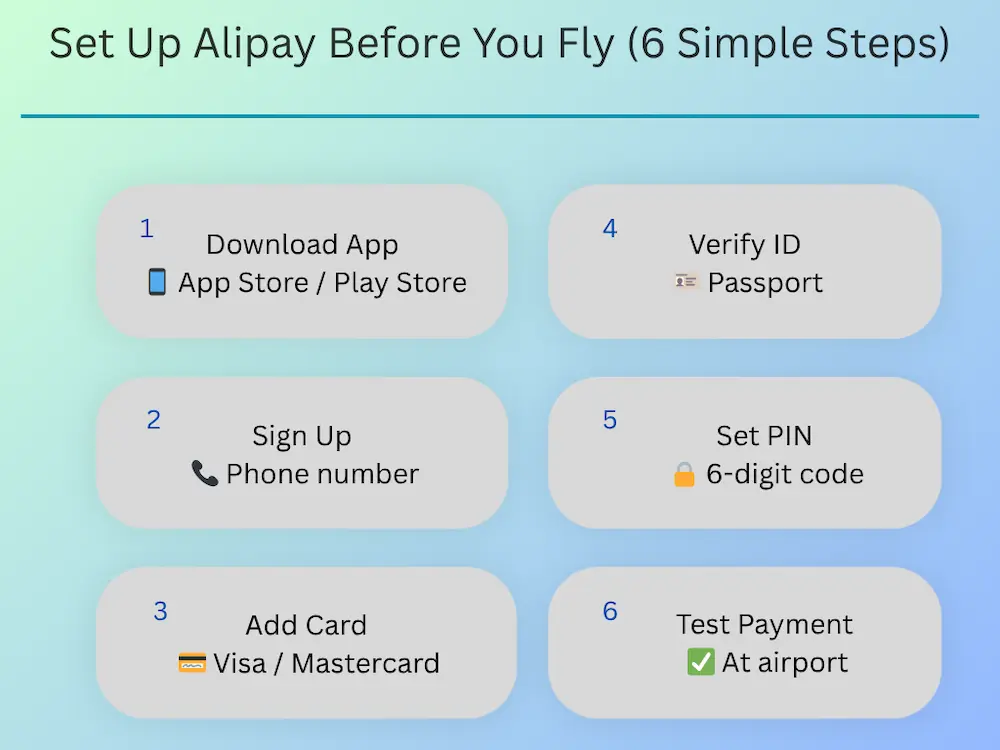
If you’re visiting China for the first time, set up Alipay before leaving home.
Technically, you can do it after arrival, but trying to troubleshoot verification codes while managing luggage, tired kids, and airport Wi-Fi isn’t anyone’s idea of a good start to a family holiday.
We strongly recommend completing the setup a few days before your flight while your normal mobile number and banking apps are easily accessible.
The old Alipay Tour Pass is discontinued. You now link your UK/US/International card directly to the main Alipay app. It’s much simpler!
Step 1: Download the Official Alipay App
Download the standard Alipay app from the Apple App Store or Google Play Store.
Make sure you’re installing the official Alipay application and set the language to English if needed.
Step 2: Register With Your Home Phone Number
Use your regular US, UK, European, Australian, or international mobile number.
Alipay will send a verification code by SMS during registration.
Step 3: Complete Passport Verification
Go to:
Account → Identity Verification
Upload your passport details and follow the verification prompts.
This step is important because unverified accounts may encounter payment restrictions or verification requests later.
What Happens After You Log In to Alipay?
After signing in with your phone number and entering the verification code, Alipay will ask you to select your country or region and complete identity verification. For most international travelers, the app automatically switches to English once you’ve chosen your home country.
If some menus still appear in Chinese, you can easily change the language manually:
- Tap the Account icon at the bottom of the screen.
- Tap the Settings icon in the top-right corner.
- Select General.
- Tap Language.
- Choose your preferred option, such as English (US) or English (UK).
Once updated, most of the app—including payment, transport, and travel services—will be displayed in English, making it much easier to use while traveling in China.
Step 4: Link Your Credit or Debit Card
Add your preferred Visa, Mastercard, or other supported international card.
If possible, use a card that doesn’t charge foreign transaction fees.
Step 5: Create a Family Backup
If two adults are traveling together, set up Alipay on both phones.
This became one of our best travel decisions in China.
If one phone battery dies, loses signal, or disappears into the depths of a stroller bag, you’ll still have a working payment method.
How to Pay in Stores Using Alipay
Once your account is verified, paying is surprisingly simple.
Option 1: Show Your QR Code (Most Common)
Open Alipay and tap Pay/Receive.
The cashier scans your QR code, and payment is completed instantly.
This is the method we used most often while traveling with kids because it’s quick and requires fewer taps.
Option 2: Scan the Merchant’s QR Code
Tap Scan, point your camera at the merchant’s QR code, enter the amount if required, and confirm payment.
Both methods are widely accepted throughout China.
Your First 30 Minutes in China: Make a Test Payment

The first thing we recommend after landing is making a small purchase.
Buy a bottle of water, a snack, or a coffee from an airport convenience store.
Why?
Because it’s much easier to solve any payment issues while you’re still at the airport than when you’re standing in a crowded restaurant later that evening with hungry children.
Once that first payment works, most of the anxiety disappears.
Turn Off Your VPN If Payments Fail
Alipay and WeChat Pay do not require a VPN.
In fact, VPNs occasionally interfere with payment verification or cause “System Busy” errors.
If a payment fails unexpectedly, temporarily disable your VPN and try again.
For most tourists, this solves the problem immediately.
Step-by-Step: Setting Up WeChat Pay Before Your Trip
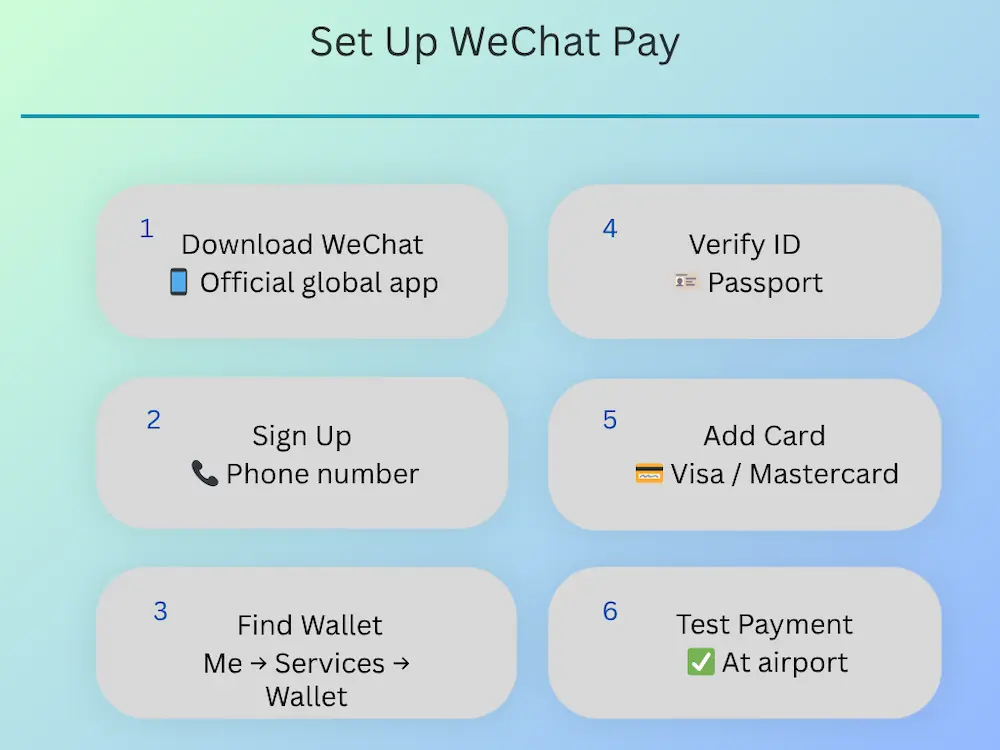
While Alipay is our first recommendation for most families, WeChat Pay is still worth installing before you travel to China.
Why?
Some restaurants, coffee chains, and mini-program services operate within the WeChat ecosystem. Having both apps gives you a useful backup if one payment method encounters a temporary issue.
Setting up WeChat Pay is much easier than it used to be.
Step 1: Download WeChat
Download the official WeChat app from the Apple App Store or Google Play Store.
Step 2: Register Using Your Home Mobile Number
Use your normal US, UK, European, Australian, or international phone number.
You’ll receive an SMS verification code during registration.
Step 3: Complete Passport Verification
Open:
Me → Services → Wallet
Follow the prompts to verify your identity using your passport.
If you don’t immediately see the Wallet or Services section, update the app and complete the initial account setup first.
Step 4: Link Your Credit or Debit Card
Add your Visa, Mastercard, or other supported international card.
Most tourists can now link international cards directly without needing a Chinese bank account.
A Note for Apple Users
In some regions, WeChat Pay supports Apple Pay integration for eligible cards.
Think of this as a convenience feature rather than a replacement for proper card verification.
If your card links successfully through the normal setup process, that’s usually the simplest option.
What If WeChat Asks for Friend Verification?
This is the most common reason tourists get frustrated with WeChat.
Occasionally, WeChat may ask an existing user to verify their account as part of its security process.
If this happens, don’t panic.
Many travellers simply ask a hotel receptionist, local guide, colleague, or friend who already uses WeChat to complete the verification.
And if you’re still stuck?
Just use Alipay.
This is exactly why we recommend installing both apps before your trip.
2026 WeChat Pay update for international visitors
WeChat Pay has continued to improve its support for international visitors. In 2026, Tencent introduced additional fee relief for first-time users who link an international bank card, along with expanded multilingual payment guidance.
Check the current terms in the app before relying on any promotional fee waiver, as these offers can change.
Our Recommendation
If you’re short on time, prioritize Alipay.
If you have an extra ten minutes before your trip, install WeChat Pay as well.
We relied on Alipay for most purchases during our family travels in China, but having WeChat Pay available provided an extra layer of backup and peace of mind.
Common Payment Problems Tourists Face

Once Alipay or WeChat Pay is set up correctly, payment problems are surprisingly rare.
That said, there are a few issues that catch first-time visitors off guard.
1. “Payment Failed” Error
This is usually caused by one of three things:
- Passport verification hasn’t been completed.
- Your bank declined the linked card.
- The app needs an additional security check.
If a payment suddenly fails, check your verification status first.
2. “System Busy” Error
This is one of the most common temporary errors tourists encounter.
In many cases, turning off your VPN and trying again solves the issue immediately.
3. My Card Was Declined Even Though It Works at Home
Don’t panic—this is usually a bank security issue, not an Alipay problem.
Some banks automatically flag transactions from China as unusual activity, especially if you haven’t traveled internationally recently.
Before your trip, notify your bank that you’ll be visiting China and carry a second card as a backup. During our travels, having two different cards gave us extra peace of mind in case one encountered a temporary security block.
4. SMS Verification Codes Not Arriving
Always complete registration before leaving home whenever possible.
Trying to receive verification texts while switching between airport Wi-Fi, roaming data, and VPN connections can create unnecessary headaches.
What If Alipay Stops Working?
This is exactly why we recommend installing WeChat Pay as a backup.
Most families never need it, but having a second payment option provides valuable peace of mind during your trip.
Quick Troubleshooting
If Alipay or WeChat Pay doesn’t work as expected, don’t panic. Most problems can be fixed in a few minutes.
| Problem | Quick solution |
|---|---|
| Your card won’t link. | Check that international online payments are enabled and confirm your bank supports overseas transactions. |
| Payment failed | Turn off your VPN, check your internet connection, and try again. |
| The SMS verification code doesn’t arrive. | Retry using mobile data instead of public Wi-Fi and confirm your phone number is entered correctly. |
| The QR code won’t scan. | Allow camera permissions in your phone’s settings, then reopen the app. |
| A merchant only accepts WeChat Pay. | Use WeChat Pay if you’ve set it up, or pay with cash if available. |
| Your phone battery dies. | Carry a power bank so you can still access payment apps, transport QR codes, and DiDi. |
Our tip: If a payment fails repeatedly, avoid trying the same transaction over and over. Switch to your backup payment method or ask whether another QR code is available.
Fees, Limits & Money-Saving Tips
For most families, mobile payments in China are remarkably straightforward.
Still, it’s helpful to understand a few rules before your trip.
1. Do Alipay and WeChat Pay charge fees?
For most day-to-day purchases, no.
However, Alipay and WeChat Pay may charge a 3% service fee on certain transactions above 200 RMB (approximately $28 USD / £22 GBP) when using international cards.
Most families only notice this on:
- Larger restaurant bills
- Hotel payments
- Attraction tickets
- Shopping purchases
cial rule or guaranteed workaround, but many local restaurants are familiar with the fee threshold and may be willing to help.
If you’re worried about the language barrier, save a translated request on your phone before your trip and show it at the counter.
For bigger purchases such as hotels, theme parks, or attraction tickets, it’s usually easier to accept the small fee and focus on enjoying your trip.
Our view? Don’t let fee anxiety overshadow your holiday. For most families, the convenience of paying instantly through Alipay or WeChat Pay is worth far more than the occasional extra few yuan.
2. Payment Limits for Tourists
Verified tourist accounts generally have limits that are more than sufficient for normal family travel.
You’ll comfortably be able to pay for:
- Hotels
- Attractions
- DiDi rides
- Restaurants
- Train tickets
without needing a Chinese bank account.
3. Is the e-CNY App Worth Using?
You may see recommendations for China’s official digital currency app (e-CNY).
While it can be useful for some travellers, most families won’t need the extra setup.
Our recommendation? Keep things simple…
Set up Alipay before your trip, install WeChat Pay as a backup, and don’t arrive in China relying only on physical cards or cash.
Real-Life Family Payment Tips in China

Setting up Alipay is one thing.
Using it smoothly while juggling children, snacks, strollers, and sightseeing is something else entirely.
These are the lessons we learned while traveling through Beijing, Shanghai, Chongqing, Chengdu, and Zhangjiajie with two young children.
1. QR-Code Menus Are Completely Normal in China
One of the biggest surprises for first-time visitors is that many restaurants don’t hand you a traditional menu.
Instead:
- Scan the QR code on the table.
- Browse the menu on your phone.
- Place your order digitally.
- Pay through the app.
It feels strange at first.
By the third day, you’ll probably wish more countries worked this way.
2. DiDi Is a Lifesaver for Families
When little legs are tired or the weather turns bad, DiDi becomes your best friend.
The app automatically handles the address translation, payment, and navigation.
No explaining destinations.
No counting cash.
No language barriers.
Just book and go.
If Chongqing is part of your itinerary, our Chongqing With Kids guide has more practical tips for getting around this famously hilly city with children.
3. Keep an Emergency Cash Stash
Even though China feels cashless, we still recommend carrying 300–500 RMB ($40–70 USD) for emergencies.
Think of it as your backup plan rather than your daily spending money.
4. Never Leave the Hotel Without a Power Bank
This is the most important family payment tip in the entire guide.
In China, a dead phone doesn’t just mean no photos.
It means:
- No money
- No transport QR codes
- No DiDi
- No restaurant menus
A power bank quickly becomes one of the most valuable items in your day bag.
Common Mistakes Parents Make Before Flying to China
Most payment problems in China can be avoided with a little preparation before you leave home. These are the mistakes we see most often.
Waiting until you arrive to set up Alipay and WeChat Pay
Airport Wi-Fi, tired kids, and delayed SMS verification codes can make setup frustrating. Complete everything before your flight whenever possible.
Relying only on Apple Pay or physical bank cards
Although international cards are accepted in some places, most everyday payments in China are made by scanning QR codes with Alipay or WeChat Pay.
Skipping passport verification
An unverified account may work at first but can trigger additional checks or payment limits during your trip.
Travelling with only one payment card
Banks occasionally block overseas transactions for security reasons. Carrying a second card gives you a simple backup if one is declined.
One Working App Is Better Than Two Perfect Apps

If China feels intimidating right now, that’s completely normal.
Most of us grew up using cash, bank cards, Apple Pay, or Google Pay. Landing in a country where almost everything revolves around QR codes can feel overwhelming at first.
But here’s the good news:
You don’t need to master every payment system in China.
You don’t need a Chinese bank account.
You don’t need to speak Mandarin.
And you definitely don’t need a separate app for every family member.
For most parents, one verified Alipay and WeChat Pay account, one linked international card, and one charged phone are enough to handle almost everything—from metro rides and DiDi taxis to dumplings, theme parks, and late-night convenience store runs.
That’s exactly how we traveled through Beijing, Chongqing, Chengdu, and Zhangjiajie with two children.
Once that first payment goes through, the anxiety disappears remarkably quickly.
And that’s when the real adventure begins.
FAQ: Paying in China as a Tourist (2026)
Is Alipay Enough in China?
For most tourists, yes. Alipay works for metro rides, DiDi taxis, restaurants, supermarkets, attractions, and everyday purchases throughout China. WeChat Pay is useful as a backup, but most families can comfortably travel using Alipay alone.
Do I Need WeChat Pay in China?
Not necessarily. Most visitors can complete their trip using Alipay. However, some restaurants, mini-programs, and local services work better within the WeChat ecosystem, which is why we recommend installing WeChat Pay as a backup.
Is Alipay Safe for Americans and Europeans?
Yes. Alipay uses identity verification, payment PINs, and biometric security features. For most tourists, it is safer than carrying large amounts of cash because payments remain protected even if your wallet is lost.
How Do Tourists Use Alipay in China?
Tourists can register using their home phone number, verify their passport, and link an international credit or debit card. Payments are then made by scanning QR codes in shops, restaurants, transport systems, and attractions.
Can Children Use Alipay in China?
Usually, one parent can handle most family payments.
Do I Need a Chinese Bank Account for Alipay?
No. Foreign visitors can use Alipay and WeChat Pay with a passport and an eligible international card. A Chinese bank account is not required for most tourist payments.
Once your payments are sorted, the rest of your China planning gets much easier. Here are a few of our practical family guides to help you plan the trip:
China With Kids: A Beginner’s Guide for Families
Best Places to Visit in China With Kids
The Ultimate 2-Week China Family Itinerary
Beijing With Kids: What We Wish We Knew Before Landing
Shanghai With Kids: Our First-Timer’s Guide
Trying to work out how much to budget for your trip?
Our China Trip Cost for Families guide covers accommodation, food, transport, attractions, and the everyday expenses families often overlook.
China may feel different from home, but it is far easier to navigate than most families expect once the payment piece is solved.

FOUNDER • FAMILY TRAVEL WRITER • MUM OF TWO
About the Author
Hi, I’m Shivani, the founder of Roaming Crew.
Based in Singapore and having lived in different parts of Asia—including two years in India—I’ve explored 18+ destinations across the region, with 12+ of those journeys taken alongside my young kids.
From choosing family-friendly destinations and navigating local transport to budgeting, accommodation, and practical travel logistics, Roaming Crew is created with a parent-first mindset.
When using the App, how do I translate what is presented in Chinese to English?
Thanks for commenting, Mark! I hope you found the guide helpful.
After logging in with your phone number and completing verification, Alipay should automatically appear in English once you’ve selected your country/region. If it doesn’t, here are the steps:
→ Tap Account (bottom of the screen)
→ Tap Settings (top-right corner)
→ Select General (just below Privacy)
→ Tap Language (second option from the top)
→ Choose English (US) or English (UK)
If any screens still appear in Chinese, you can use your iPhone’s screenshot and translate feature (or Google Lens on Android) to navigate the menus.
I also recommend setting everything up at home before your trip so you don’t have to worry about it once you arrive in China.
Thanks again for pointing this out—I’ve updated the guide above to make these steps clearer for future travelers!